How to register as a supplier on Contracts Finder
Start from Contracts Finder registration and choose Supplier in the Supplier Registration Service (SRS). Search for your organisation and request access if it already has an account. Registration lets you save searches and receive email updates; you can search and apply without an account.
Last updated: · TenderNudge
Open Contracts Finder registrationWhat you need to register
Have the following details and access ready before you start your registration:
- A work email address, with access to the inbox for account activation.
- Your organisation name, headquarters postcode and country.
- Your D-U-N-S number if you have one, to help find the right organisation record.
- Your business and contact details for the registration form.
- A new password for your SRS account, if you are creating one.
Registration and first steps
Open Contracts Finder registration
Open the Contracts Finder registration page and choose Register. It takes you to the Supplier Registration Service (SRS).
If you already have an SRS account, sign in to Contracts Finder with that email and password.
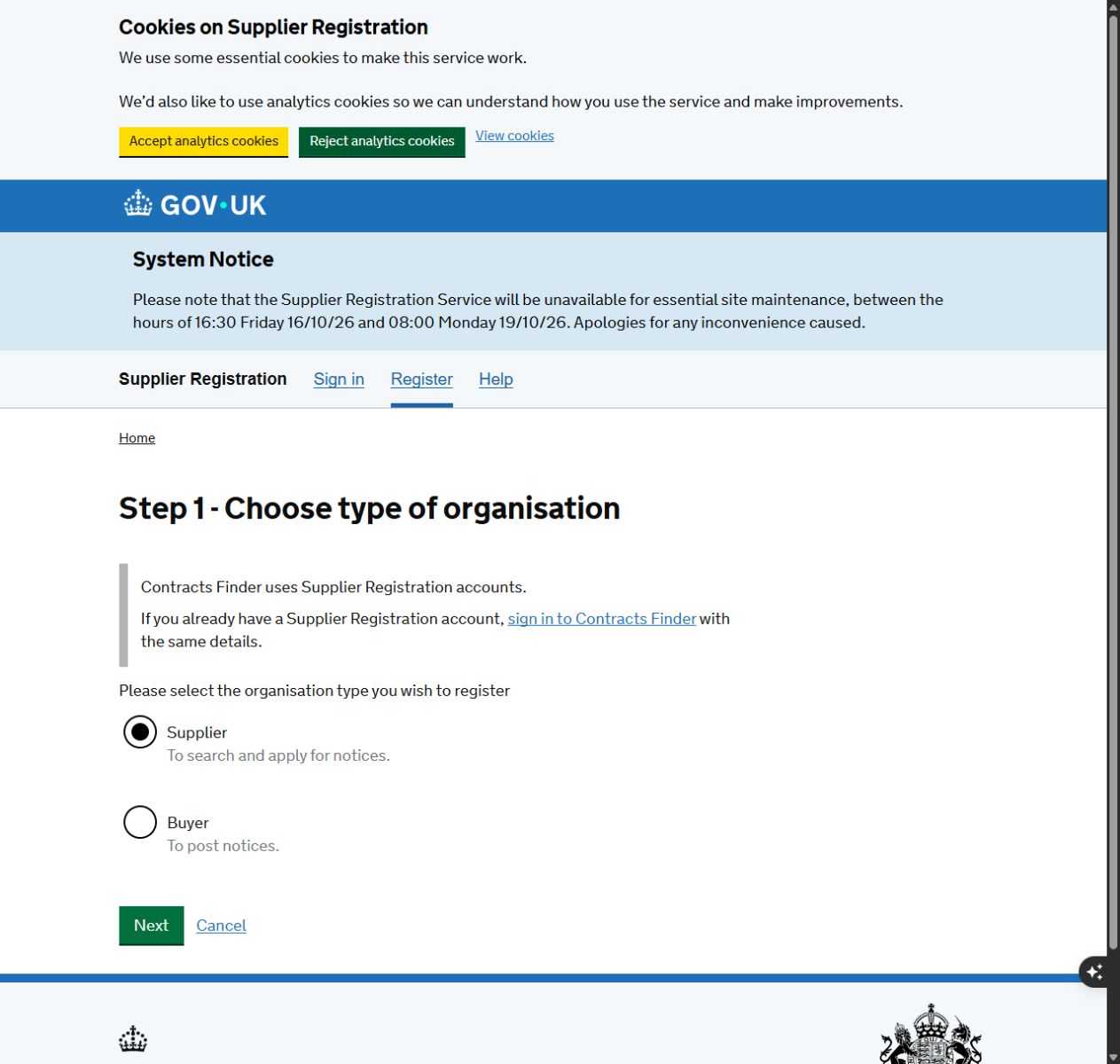
Choose Supplier
Select Supplier to register for supplier functions. The Buyer option is for organisations that publish notices.
Search for your organisation
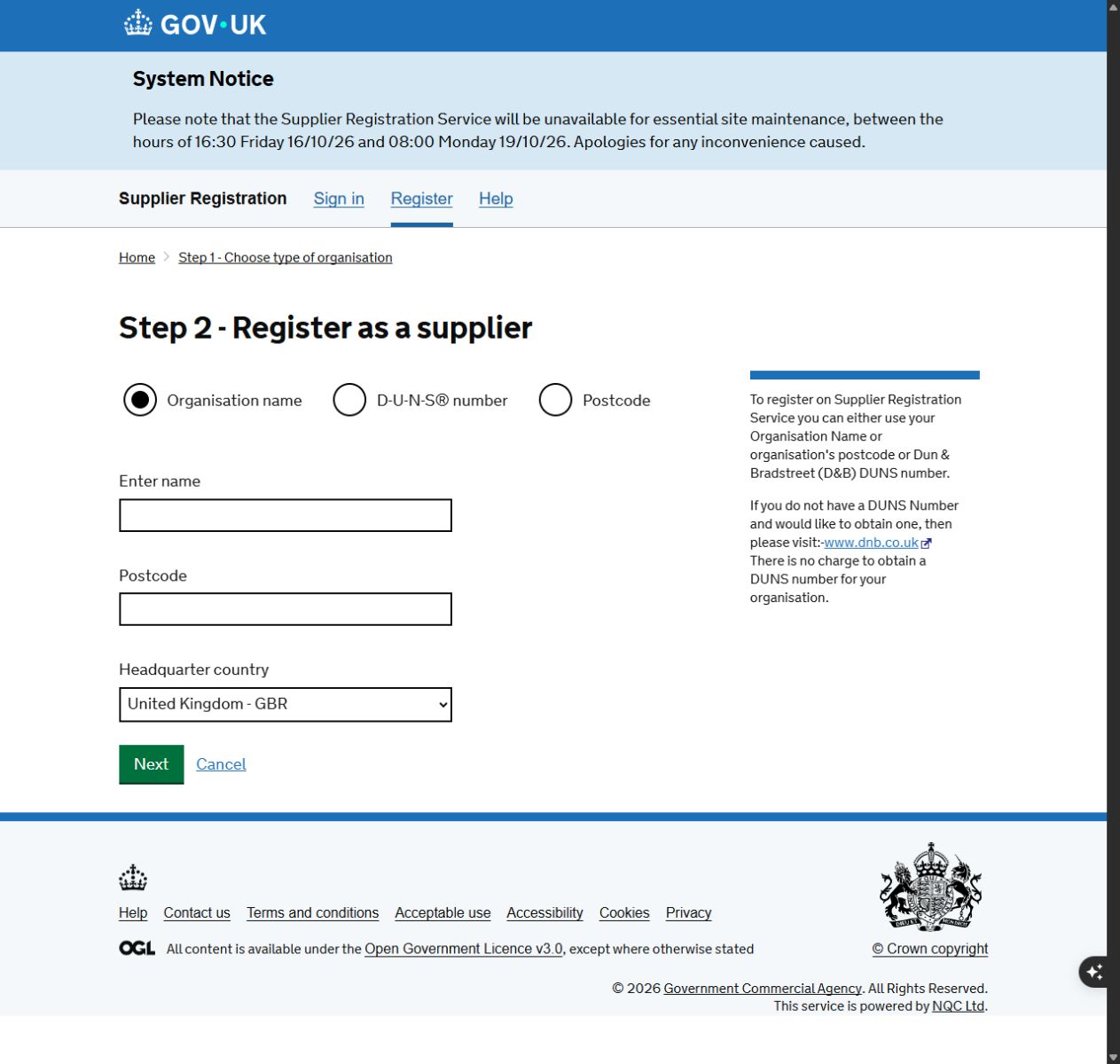
Search by organisation name, D-U-N-S number or postcode. The organisation-name search asks for your name, postcode and headquarters country.
Choose the correct business record. If it is not listed, use the option for an organisation you cannot find or a D-U-N-S number you do not know, then enter the details requested.
Request access or register a new organisation
If the organisation already has an SRS account, request access to its record. The request goes to its User Manager, or to support if there is no active administrator.
If it is a new organisation, complete the supplier registration form using your business and contact details. Follow the required fields and password rules shown on the form.
Activate your account and sign in
Open the SRS activation email and follow its instructions. Then sign in to Contracts Finder with your SRS email and password.
The first user on an organisation account becomes its User Manager and can approve later users. Each colleague should request their own access.
Find a Tender uses the separate Central Digital Platform and GOV.UK One Login. An SRS account does not replace that registration.
Save searches for email updates
While signed in, search for opportunities, adjust the filters and save the search for email updates. Review your saved searches when your services or working areas change.
Keep searches broad enough to catch relevant notices. Product or service categories in your SRS profile can also help buyers find your business, but they do not guarantee invitations.
Read the notice and apply
Check the notice documents, deadline and application instructions. The buyer may use a separate bidding portal or give another submission route.
Prepare the response the buyer requests and submit it through that route before the deadline.
Common problems
I already have an SRS account. Should I register again?
Sign in to Contracts Finder with your existing SRS email and password. Request access if you need to join an organisation record.
My organisation appears in the search results.
Choose the existing record and request access. Its User Manager approves new users; support handles requests where there is no active administrator.
I cannot find my organisation or its D-U-N-S number.
Try searching by organisation name or postcode. If that fails, use the registration option for an organisation you cannot find or a number you do not know. Dun & Bradstreet can also help you look up a D-U-N-S number.
The activation email has not arrived.
Check your junk folder and allow messages from noreply@gca.gov.uk. Contact SRS support if the activation message still does not arrive.
Can I use GOV.UK One Login?
Contracts Finder uses SRS email and password accounts. GOV.UK One Login is used for Find a Tender, which is a separate service.
Frequently asked questions
Is Contracts Finder registration free?
Yes. Contracts Finder and SRS supplier access are free.
Do I need an account to search or apply?
No. You can search and apply without a Contracts Finder account. An account adds saved searches and email updates. A notice may direct you to a bidding portal that requires its own account.
Will an SRS profile guarantee buyer invitations?
No. Buyers can use your categories to identify suppliers, but invitations are not guaranteed. Continue searching for notices that suit your business.
Where can I find larger UK opportunities?
Search Find a Tender as well. Higher-value UK opportunities are usually published there, and it uses a separate GOV.UK One Login account.
Official links and help
- Contracts Finder registration
- Supplier Registration Service registration
- Contracts Finder on GOV.UK
- Supplier Registration Service help
- SRS activation email help
- Supplier Registration Service terms
- SRS and Central Digital Platform accounts
- GOV.UK Find a Tender registration guide
- Contracts Finder API documentation